Built by a treasurer

The member administration that keeps itself up to date For boards who do this alongside a job

Ledenboek is membership administration for associations without the manual work: new members sign themselves up through the member portal, dues are collected automatically and the built-in accounting software keeps the annual figures ready for the general meeting.

For sports clubs, choirs, hobby and neighbourhood associations, foundations and homeowner associations. From ten members to thousands.

30 days free
No credit card required
Get started right away
Features

Everything you need in one clear system

From the member list to the annual figures. Built for volunteers, not for bookkeepers.

Your member list is right again

A central overview of all your members with smart filters, exports and synchronisation.

  • Automated registration flow
  • Export to Excel & CSV
  • Embed on your own website

Dues collect themselves

Receive membership fees and activity contributions directly online via iDEAL and more.

  • Mollie integration
  • Automatic reminders

Sign-ups without endless emails

Organise activities with online registrations and a waiting list feature.

  • Online registration system
  • Differentiated rates
  • Automatic confirmation emails

New members handle it themselves

Save time with smart workflows for registrations and payments.

  • Visual workflow editor
  • Automatic notifications
  • Custom workflows

Know where your association stands

Gain insight with extensive statistics on members and activities.

  • Member numbers and trends
  • Activity analysis
  • Exports and reports

Works with the website you already have

With a few lines of code you put the registration form, member list or calendar on your own website. Works on any site, WordPress included.

  • Works on any website
  • Automatic synchronisation
  • Member portal on your website

See who has not paid yet

Full insight into your finances with bank integration, annual figures and forecasts.

  • MT940/CAMT bank import
  • Annual figures for the general assembly
  • Financial forecast
More about accounting software for associations

Your members' data is safe

Member data stored safely with modern security techniques.

  • Two-factor authentication (2FA)
  • Encrypted data storage
  • GDPR compliant

The audit committee can check for itself

Fully digital audit committee process with transparent review and legally sound discharge.

  • Online transaction review
  • Questions & comments per transaction
  • Digital signing of discharge

Just ask your AI

New

Connect your AI assistant directly to your association data. Ask questions in plain language: "How many active members do we have?", "Who is on the board?", "What are the outstanding invoices?" — your AI assistant retrieves real-time answers from Ledenboek.

  • Works with Claude, ChatGPT and more
  • Personal URL per board member
  • Role-based access — automatically secured
  • Nothing to install — just add a URL
Benefits

Why associations choose Ledenboek

⚡

Save 10+ hours per month

Automate repetitive tasks and focus on what really matters: your members and activities.

✨

Professional appearance

Tidy emails in your own house style, online payments and a member portal. Your members will notice.

📈

Dues actually come in

Online payments and automatic reminders ensure faster and more complete fee collection.

Live Demo

See Ledenboek in action

Discover how easy association management can be with our intuitive dashboard, membership management, committees and events.
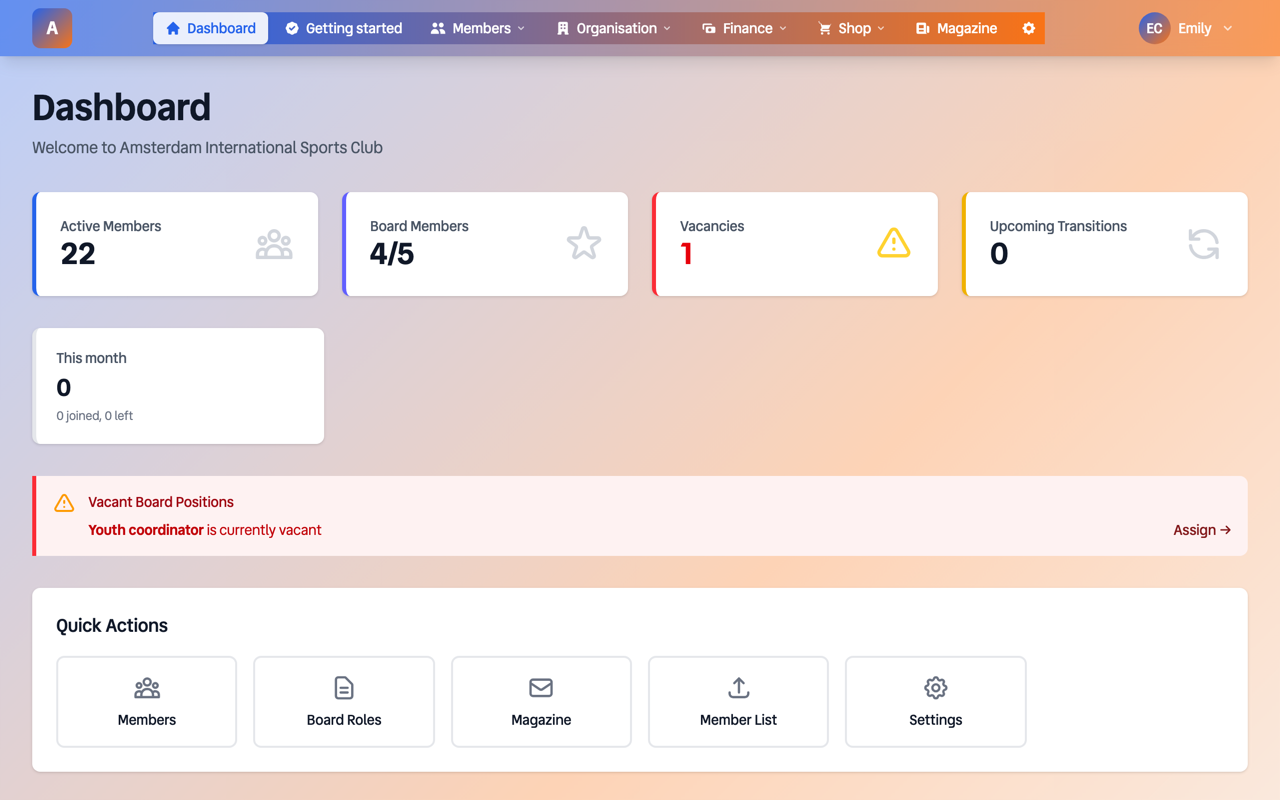
Dashboard - Vereniging De Toekomst
Ledenboek Dashboard

Clear Dashboard

At a glance you see the number of members, board members, vacancies and upcoming transitions. The current board and recent members are directly visible.
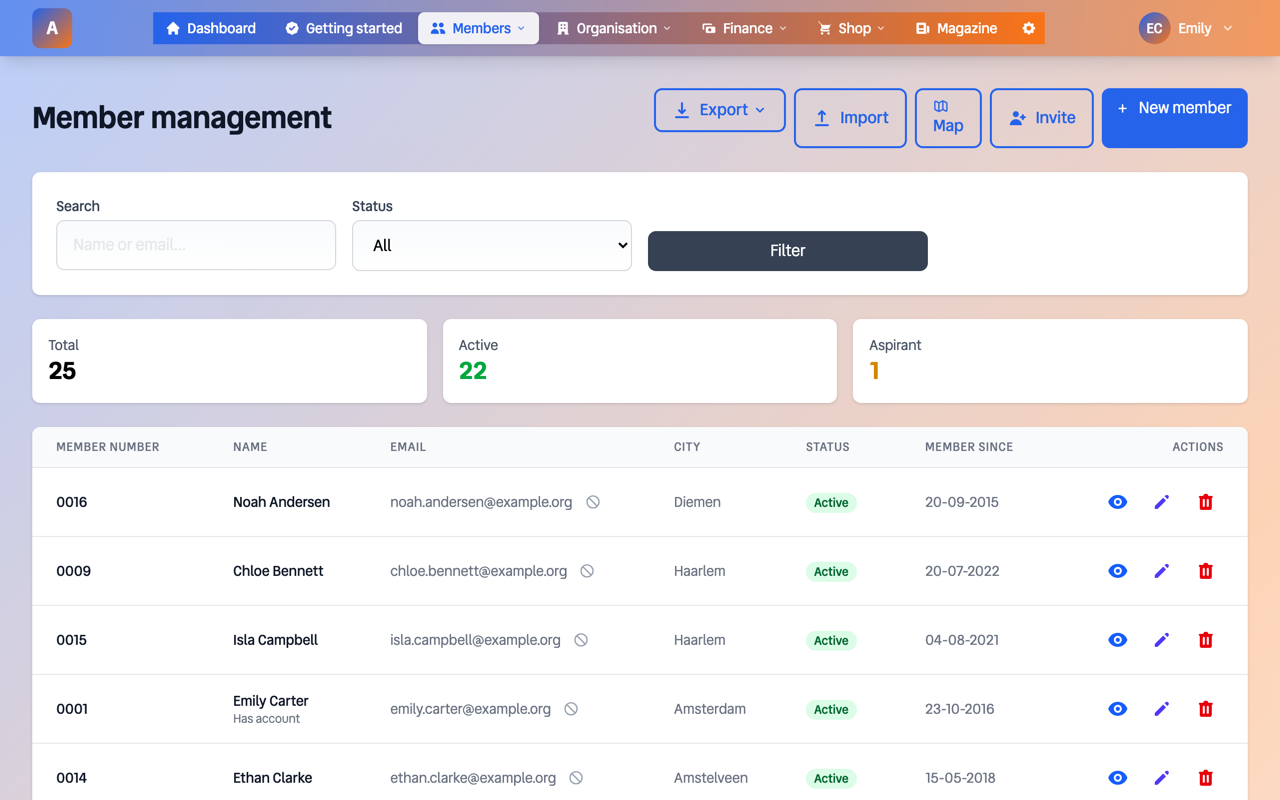
Membership management
Ledenboek Membership Management

Complete Membership Management

Search, filter and export. See who has an account and manage everything in one place.
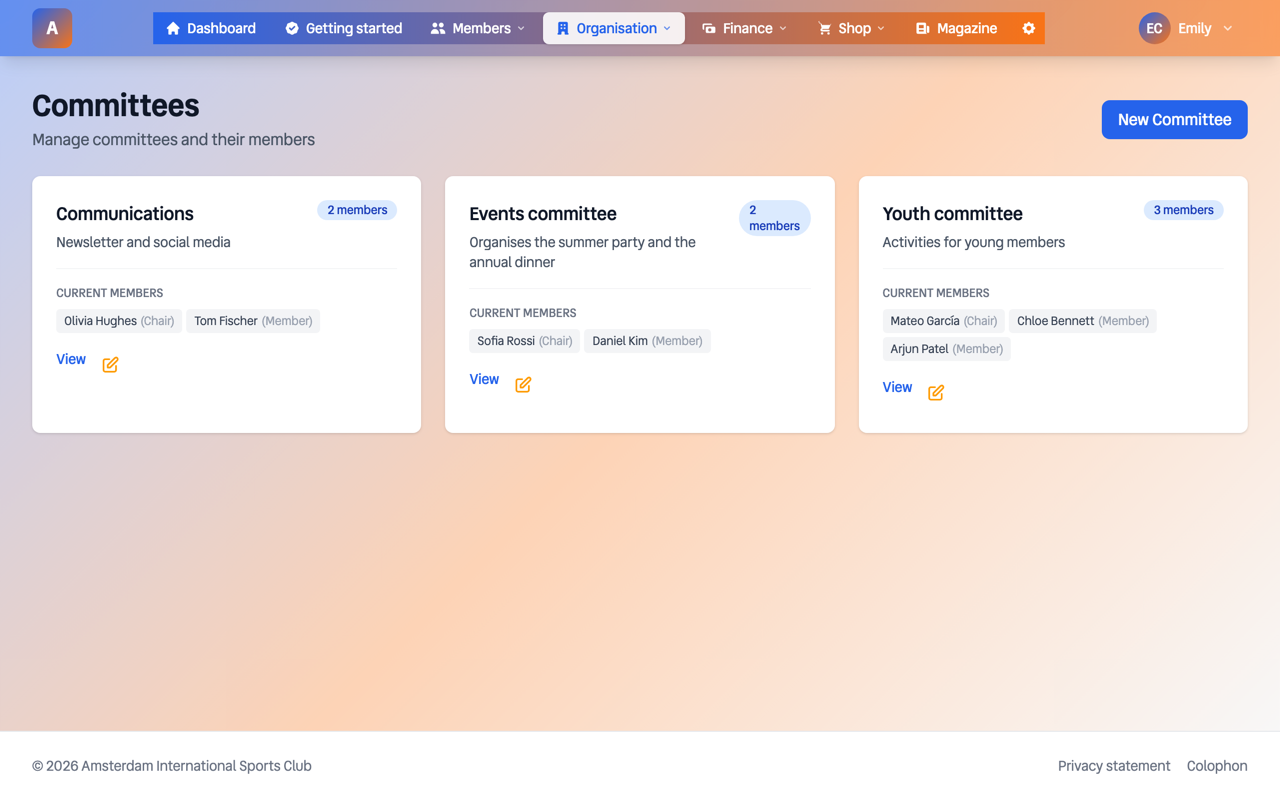
Committees
Ledenboek Committees

Committees & Working Groups

Organise committees with members, external advisors and clear role descriptions.
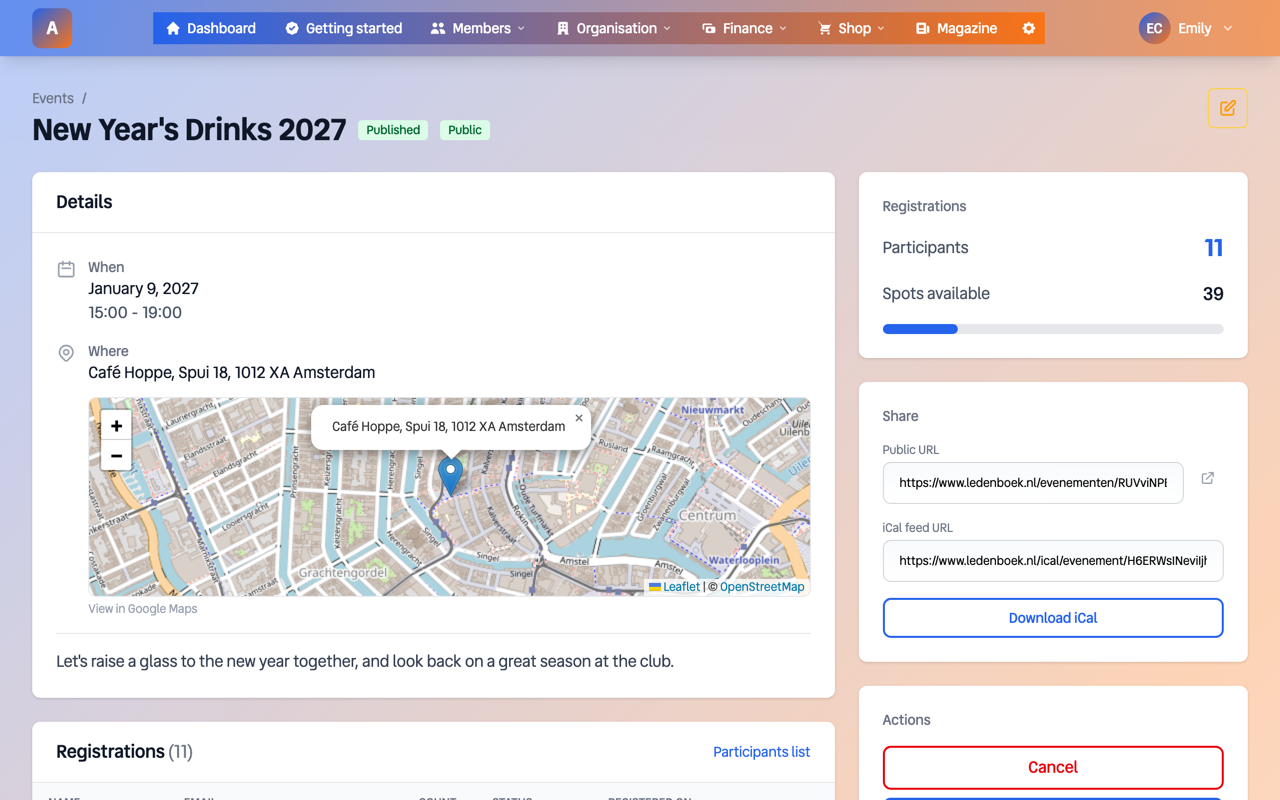
Event - New Year's Reception 2025
Ledenboek Event Detail

Events with Registrations

Organise events with a location on the map, manage registrations, export attendee lists and iCal integration for calendars.

Convinced? Start with Ledenboek today.

Try for free
Pricing

Simple and transparent

No hidden costs. Cancel at any time. Start with a 30-day free trial.

All features included with every subscription

If you collect member fees through our Mollie connection, we retain 2% of the amount paid. If you submit the SEPA direct debit file to your own bank, we charge nothing per transaction. Your payment provider costs come on top.

Mini

Perfect voor kleine verenigingen

€8,25 /month

€99/year

~€0,17/member/month

1-50 members

Start free
POPULAR

Basis

Voor groeiende verenigingen

€14,92 /month

€179/year

~€0,10/member/month

51-150 members

Start free

Standaard

Voor actieve verenigingen

€24,92 /month

€299/year

~€0,08/member/month

151-300 members

Start free

Plus

Voor grote verenigingen

€37,42 /month

€449/year

~€0,07/member/month

301-500 members

Start free

Large

For associations with more than 500 members

€449 per year, unlimited

500+ members

Start free

All plans include 30 days free. No credit card required. Cancel at any time.

Frequently asked questions

Everything you want to know about Ledenboek

Find answers to the most frequently asked questions about our membership management system. From pricing to features, from security to integrations.

General

What is Ledenboek?

Ledenboek is a complete online membership management system developed specifically for Dutch associations. It offers all the tools you need for professional association management: member administration, online payments via iDEAL, membership fee collection, invoicing, activity management, board management, committees, email communication and workflow automation. All in a clear and user-friendly platform that you can access from anywhere.

Which associations is Ledenboek suitable for?

Ledenboek is suitable for virtually all types of associations in the Netherlands: sports clubs (football, tennis, hockey, swimming, athletics), hobby clubs (photography, chess, bridge, model building), interest groups, cultural associations (music, theatre, arts, choir), neighbourhood associations, student associations, business associations, staff associations and foundations. From small clubs with 10 members to large associations with 500+ members - the system scales with your needs.

How quickly can I get started with Ledenboek?

You can get started within 5 minutes. Create an account, enter your association details and you are ready. Importing an existing member list takes another 15-30 minutes depending on its size. Most associations are fully operational within an hour. Our guides and support quickly get you on your way.

Does Ledenboek work on my phone or tablet?

Yes, Ledenboek is fully responsive and works excellently on smartphones and tablets. On the go you can quickly look up a member, check a payment or send an email. The member portal for your members is also mobile-friendly, so they can easily log in and pay from their phone.

Pricing & Subscriptions

How much does Ledenboek cost per year?

Ledenboek uses transparent pricing based on the number of members:
  • Mini - €99/year (1-50 members)
  • Basic - €179/year (51-150 members)
  • Standard - €299/year (151-300 members)
  • Plus - €449/year (301-500 members)
  • Large - €449/year (500+ members, unlimited)

Important: all subscriptions contain exactly the same features. You only pay more as you have more members, never for extra features.

Is there a free trial available?

Yes, every subscription starts with a 30-day free trial. No credit card required and no strings attached. During the trial you have access to all features so you can fully try out Ledenboek with your own association. After 30 days you decide whether to continue.

Can I cancel at any time?

Yes, you can cancel your subscription at any time. There is no notice period and you are not tied to anything. Upon cancellation your subscription continues until the end of the paid period. We believe you stay with us because you are satisfied, not because you are locked into a contract.

Is Ledenboek suitable for large associations with 500+ members?

Yes, Ledenboek scales with your association. Above 500 members you pay €449 per year for an unlimited number of members, without a quote or custom deal. The technology is built to handle large numbers of members, invoices and emails without any problems.

What happens to my data if I stop using Ledenboek?

When ending your subscription you can first export all your data to Excel. We keep your data for another 60 days after which it is permanently deleted. You can also request full deletion sooner. We make sure you can switch smoothly to another system, should you wish to.

Fees & Payments

Which payment methods are supported for membership fees?

Through our Mollie integration, Ledenboek supports all popular Dutch payment methods: iDEAL (all banks), credit card (Visa, Mastercard, American Express), Bancontact, PayPal, SEPA transfer and Apple Pay. Your members can always pay in the way they prefer. All payments are processed securely and quickly.

How does membership fee collection work with Ledenboek?

Ledenboek automates your entire membership fee collection. You set the fee amounts per membership type once. The system then automatically generates invoices, sends them by email with a direct payment link, and tracks all payments. Members pay with one click via iDEAL. If payment is not received, reminders are sent automatically. You always have real-time insight into who has and has not paid.

Can I set different membership fee amounts?

Yes, Ledenboek supports an unlimited number of different membership fee amounts. You can set rates per membership type (for example senior, junior, family, honorary member), per age category, or even per individual member. Tiered discounts and family memberships are also possible. The system automatically calculates the correct amount per member.

Does Ledenboek send payment reminders automatically?

Yes, you can set up automatic payment reminders. You decide after how many days a reminder is sent and how many reminders go out at most. The emails are fully customisable to your association and contain a direct payment link. This saves you hours of administrative work and increases the percentage of on-time payments.

How do I create an invoice for an individual member?

In addition to the automatic membership fee invoices, you can also create invoices manually. Select the member, add invoice lines (for example for a workshop or materials) and send the invoice by email with a payment link. The member pays directly via iDEAL and the payment is registered automatically.

Can I connect Ledenboek to my accounting?

Yes. Ledenboek has its own general ledger, balance sheet and statement of income and expenses, so many associations do not need a separate accounting package. If you do want to transfer it, Ledenboek produces an audit file (XAF) and the journal as csv, which every common accounting package reads. Read more about how Ledenboek works as accounting software for associations.

Membership Management

How do I import my existing member database?

Importing your existing member list is easy. Upload an Excel file with your member data. Ledenboek automatically recognises common column names (name, address, email, date of birth, etc.) and helps you map fields correctly. After review, you import everything with one click. Most associations are fully operational within an hour.

Which member data can I keep track of?

Ledenboek offers extensive capabilities for membership management. Standard fields: name, address, email, phone, date of birth, membership type, registration date, fee amount and payment status. In addition, you can add unlimited custom fields for specific information such as federation number, clothing size, dietary requirements, or whatever your association needs. All data is searchable and exportable.

Can members update their own details?

Yes, through the member portal members can log in to view and update their own details. They see their address details, membership information, payment history and outstanding invoices. They process address changes or a new email address themselves. This saves the board a lot of administrative work and ensures data is always up to date.

How do I set up online registration for new members?

Ledenboek generates a unique registration page for your association. New members enter their details here, choose their membership type and pay their membership fee directly via iDEAL. After successful payment they are automatically added to your member database and receive a welcome email. The entire process is fully automated.

Can I record relationships between members (family members)?

Yes, Ledenboek supports relationship links between members. You can record family relationships (parent-child, partners), but also spouses and siblings. This is useful for family memberships, invoicing to one address or tracking youth members with their parents.

How do I keep track of which members have cancelled?

Ledenboek registers all cancellations automatically. You process a cancellation in the member file, with an end date and a reason; members cannot do it themselves in the member portal. You see the cancellation date, reason (if provided) and the end date of the membership. Historical data is retained for your administration. This gives you continuous insight into your membership changes and turnover.

Can I add custom fields to member profiles?

Yes, you can add unlimited custom fields to the member profile. Create text fields, number fields, date fields, dropdown selections or checkboxes. Examples: federation number, clothing size, dietary requirements, driving licence or competition class. All custom fields are searchable, filterable and exportable.

Integrations

Can I put Ledenboek on my own website?

You put the registration form, member list or calendar on your own website with a few lines of code. That works on any site, WordPress and Wix included, or a hand-built page. What you embed stays current by itself, because it comes straight from Ledenboek.

Do I need a developer for that?

No. You copy a snippet from Ledenboek and paste it where you want it. In WordPress that can go in an ordinary text block. If you get stuck, email us and we will look at it with you.

Does Ledenboek offer an API for integrations?

Yes, for your own website. With an API key your website registers new members, updates details and processes cancellations; the WordPress plugin runs on it. For lists on your site there are embeddable components, and a separate connection for AI assistants. A general API to read out all your data does not exist; email us if you want to connect something specific.

Does Ledenboek export to Excel?

Yes, you can export all data to Excel (XLSX) or CSV. Export your complete member list, a filtered selection, payment overviews or address lists. The exports contain all relevant columns and are directly usable for mail merge, analysis or delivery to third parties (e.g. federation or insurance).

How does the AI integration with Claude and ChatGPT work?

Ledenboek supports the Model Context Protocol (MCP), the open standard that allows AI assistants such as Claude and ChatGPT to retrieve data directly from external systems. Every board member gets a personal, secured URL that you simply add to your AI assistant. You can then ask questions in plain language: "How many members do we have?", "Who is on the audit committee?", or "What are the outstanding invoices?" Your AI assistant queries Ledenboek in real time and gives you an immediate answer. The integration respects your role — a treasurer sees financial data, a secretary does not. When your position ends, access stops automatically. There is nothing to install: it is just a URL.

Security & Privacy

How secure is my member data in Ledenboek?

Security is a top priority at Ledenboek. All data is transmitted encrypted (TLS), and sensitive keys are stored encrypted in the database. We make automatic daily backups. Our servers are located in a secure data centre in Europe. We are fully GDPR-compliant and never share data with third parties. Access to the system is secured with strong passwords and two-factor authentication (2FA).

What is two-factor authentication (2FA)?

Two-factor authentication (2FA) adds an extra layer of security to your account. In addition to your password, you need a code from an authenticator app on your phone (such as Google Authenticator or Microsoft Authenticator). Even if someone knows your password, they cannot log in without your phone. You can easily enable 2FA in your account settings.

Does Ledenboek comply with GDPR legislation?

Yes, Ledenboek is fully GDPR-compliant. We only process personal data for the purposes for which it was collected. Members can view, correct and have their data deleted. We offer a data processing agreement and help you meet your obligations as data controller. Privacy by design is a core principle in our software.

How are email bounces and invalid addresses handled?

Ledenboek automatically tracks which emails do not arrive (bounces). You get an overview of invalid email addresses so you can correct them. The system prevents repeated sending to faulty addresses, which protects your sender reputation and ensures your messages actually arrive.

Features

Can I send emails to my members?

Yes, Ledenboek includes extensive email functionality. You can send messages to all members, specific groups or individual members. Emails are sent in your own branding with your association logo. You can create templates for frequently used messages. All sent emails are logged so you can always see what has been sent.

Does Ledenboek support groups and committees?

Yes, you can create unlimited groups and committees. Think of teams, working groups, committees or departments. Per group you determine which members belong to it and who the contact person is. You can easily send emails to specific groups. This is ideal for sports teams, event working groups or department-specific communication.

How does board management work?

Ledenboek automatically keeps track of your board composition. You register who holds which position (chair, secretary, treasurer, etc.) including start and end dates. The system always shows the current board and keeps the full history. Useful for your website, Chamber of Commerce registration and annual reports. Board members automatically receive the appropriate access rights.

Can I set different access rights?

Yes, Ledenboek works with an extensive permission system. You determine per board position or committee which sections are accessible. For example, the treasurer gets access to finances, while the membership administrator can only manage member data. This way you work safely with multiple people without everyone having access to everything.

Does Ledenboek offer support for magazines?

Yes, Ledenboek includes a dedicated magazine module. You manage your mailing list for the club magazine, including extra addresses (honorary members, sponsors, advertisers). You can export address lists for the printer or distributor. Non-members who receive the magazine are on it too, with name and address.

Can I manage meetings and events?

Yes, Ledenboek includes a meeting module with which you plan and track board and member meetings. You register the date, attendees and can link documents (agenda, minutes). For events you can manage registrations with online sign-up and payment. Ideal for workshops, clinics or the annual outing.

Can I generate reports and statistics?

Yes, Ledenboek offers extensive reporting capabilities. At a glance you see: total number of members, new registrations, cancellations, deaths and payment status. You can generate lists and export them to Excel for further analysis or your annual report. All data can be filtered by date, status, group and more.

Does Ledenboek have financial management?

Yes, Ledenboek includes extensive financial capabilities. You easily import bank statements (MT940/CAMT.053 format) and link transactions to members. The system automatically generates annual figures for the general assembly with clear charts of income and expenses. You can also create a financial forecast for the coming year, based on historical data and adjustable assumptions.

How does the audit committee review work?

Ledenboek offers a fully digital audit committee process. The audit committee gets access to all bank transactions of the financial year through the member portal. They can place comments per transaction and ask questions to the treasurer, who is automatically notified by email. After the review, the audit committee can approve the financial report and sign it digitally. The system automatically generates a discharge document (PDF) with all signatures, formally discharging the treasurer. The entire process takes place online, without paperwork.

Can members submit expense claims?

Yes, board members can submit expense claims digitally, with a receipt or as a mileage claim. The treasurer gets a notification, approves or rejects, and pays everything out at once with a SEPA bank file read in at the bank. Whoever is paid gets an email about it. Regular members cannot submit claims yet.

Can I customise the appearance to my association?

Yes, Ledenboek adapts to your branding. You upload your association logo and choose your primary and secondary colour. All emails, the registration form and the member portal are automatically styled in your colours. This gives your association a professional and consistent appearance towards your members.

Does Ledenboek support multiple associations?

Yes, if you manage multiple associations you can manage them all from one account. Each association has its own separated environment with its own members, settings and branding. Useful for umbrella organisations, federations or administrators who support multiple clubs.

Support

What support does Ledenboek offer?

We offer support via email and our online help centre with guides and videos. Your email reaches the people who build Ledenboek, and you usually get an answer within one business day.

Are guides available?

Yes, we have an extensive help centre with step-by-step guides, video tutorials and frequently asked questions. From importing your first member list to setting up automatic reminders - everything is clearly explained. New features always come with documentation.

Can I get a demo?

Yes, you can request a personal demo. We will show you via a video call how Ledenboek works and how it fits your association. You can ask all your questions and we help you with the first steps. Contact us via info@ledenboek.nl to schedule a demo.

Is your question not listed?

Our team is ready to answer all your questions. Get in touch and we will be happy to help you.

Try it with your own member list

Put your own member list in and see if it fits. Thirty days free, cancel anytime.

Questions? Email info@ledenboek.nl